The Opiq platform's text assistance tool helps students structure and organise the information of digital textbooks with the help of AI.
How does the text assistance tool work?
The Opiq platform's text assistance tool makes use of AI to simplify and shorten, condense, or expand the texts of learning materials.
The text assistance tool is enabled by default for all users with a valid licence. It is accessed from inside the textbook. The tool is found at the end of each text section, next to the "More like this" and "Add own content" functions. With the text assistance tool, users can:
- shorten and simplify the text of the textbook
- expand the text of the textbook
- condense the text of the textbook into a list.
The text assistance tool opens in its own pop-up view, and the texts it generates do not replace the actual text of the textbook. The tool does not process the images, exercises, or interactive materials found in the text section.
Please note that the text assistance tool is currently available as a trial version that will be developed further as time goes on. The tool uses AI to process the text automatically, which is why errors may occasionally occur in the generated text. If something seems off, we advise you to check the accuracy of the text against the textbook itself.
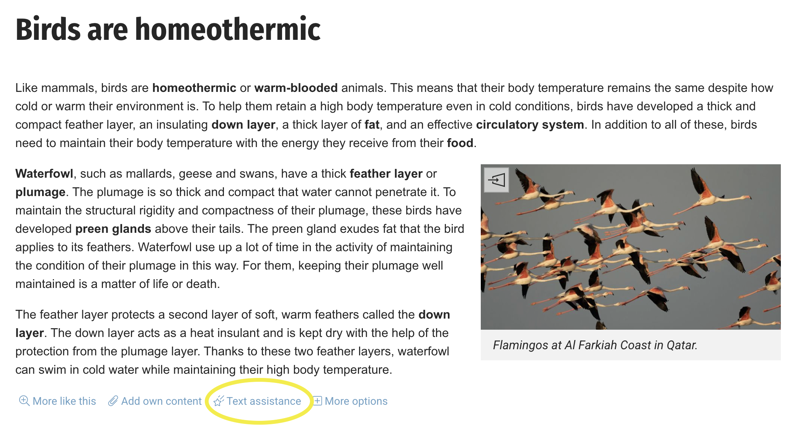
The text assistance tool can be found inside the textbook, at the end of each text section.
Features of the text assistance tool
Shorten and simplify
This feature uses AI to condense and simplify the text of the section into a shorter form. This feature is particularly helpful for language learners and pupils who experience difficulties with reading. The feature works best with longer text sections.
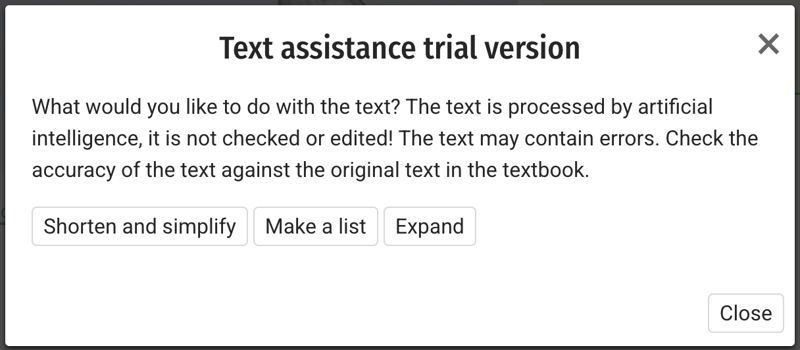
The text assistance tool opens in its own pop-up view where the user can select what they want to do to the text. The text or list created by the tool opens in the same view and does not replace the actual text of the digital book.
Make a list
This feature uses AI to search for the text’s main points and condense them into a simple list. This feature is particularly useful for taking notes and revising for exams.
Expand
This feature uses AI to expand and supplement the textbook's text using its own knowledge base. This function can be used to better understand broad or challenging topics, find in-depth information, and connect the topic with other subjects. Since this feature uses AI to create completely new text, it is advised that you approach the expanded text with a critical frame of mind.